Mac monitor router
Fulwave Monitor
Route anything to anything.
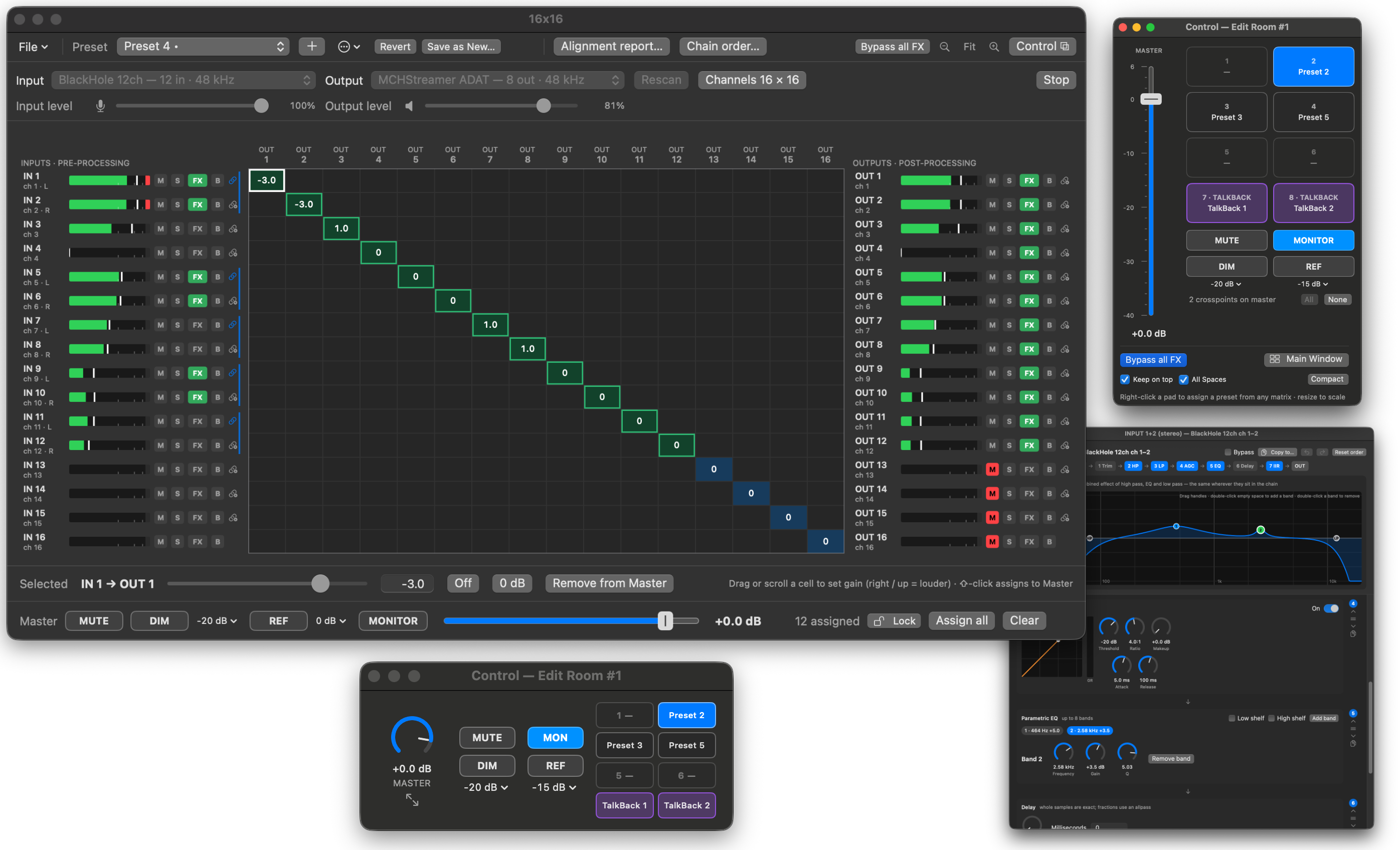
Pick any input device and any output device, put every input on every output with a gain at each crosspoint, and shape each channel with filters, EQ, compression, delay and HRTF Explorer filters, all in one window.
- Price
- Free to try; $9.99 one time
- Requires
- macOS 14 or later, Apple silicon and Intel
Try it free
The download is the whole app. It stops processing audio every 15 minutes until you buy a license, and you press Start to carry on. There is no expiry date.
A grid that follows your gear
- Up to 64 inputs by 64 outputs, with a level at every crosspoint. Type it, drag it, or scroll it.
- Different input and output devices work together; the grid sizes itself to your interface.
- Right-click a crosspoint to switch it off and back on at the same level.
- Mute and solo every channel, and gang neighbors into stereo pairs.
One master for the mix you choose
- Assign any crosspoints to the master and turn a custom mix up and down together.
- Mute, Dim and a Ref level act on just those crosspoints, and undimming restores them exactly.
- Monitor mode keeps the master live as you switch presets, so moving it never marks a preset as changed. Lock it for the session so it can't be switched off by accident.
A processing chain on every channel
- High pass and low pass, a parametric EQ with up to eight bands and shelves, and a live frequency-response graph.
- A compressor with a transfer curve and gain-reduction meter, plus delay and trim.
- Drag the blocks into any order, per channel, or set one order for all.
- Copy a channel's processing, or a single block, to any other channels, with undo.
- Bypass one channel or everything. It never clicks, and the filters stay warm.
HRTF Explorer filters
- Load the IIR filter sets exported by HRTF Explorer onto a stereo pair, with a center trim that matches HRTF Explorer's own implementation.
TalkBack built in
- Every session has a TalkBack router for talking to performers: its own mic input, output, grid, processing and presets, silent until you talk.
- Talk from purple TalkBack pads in the Control window. A click latches; holding talks only while held. Any number can be on at once.
- Each TalkBack preset can dim the monitors while you talk.
Presets for instant A/B
- Unlimited presets recall the whole mix, master, mute and solo, and every chain without a click.
- Recall from a menu, the keyboard, or eight pads in a small Control window that can float above everything else.
- Set your own keys for the pads, master volume, Mute, Dim and Bypass, and make TalkBack keys push-to-talk.
- Sessions save as
.fwmfiles that open with a double-click.
Free virtual audio devices
- Four loopback devices, installed from Preferences: Fulwave In 16, Fulwave Out 16, and a TalkBack pair.
- Send a DAW, a recorder or a meeting app into Fulwave Monitor, and take its outputs back out, without a cable.
Control from anywhere
fulwavemonitor://links let JumpDock, scripts and other apps play pads, switch TalkBack and set the master, Mute, Dim and Bypass of any matrix.- With JumpDock 2.5, mute Main from the menu bar with a click, move its master with a swipe, and right-click for every matrix and all eight pads. TalkBack and any matrix can have icons of their own.
Meters you can read
- Peak, peak with hold, RMS, and 4× oversampled true peak, with latching clip lights.
Fulwave Monitor Pro
Monitor the embedded audio of SDI sources through Blackmagic UltraStudio and DeckLink devices, add named routers and cue matrices that one fader runs, and put Audio Unit plugins on any channel. Try Pro free for 30 minutes from the app. More about Pro
Light on your Mac
- Only the channels in use cost anything. With all 64 channels running high pass, low pass, EQ, compression and delay, the engine takes about 4% of one core.
- No account, no subscription, no drivers.
- One license works on every Mac you own.
- Signed and notarized by Apple.
Price and requirements
Fulwave Monitor is $9.99, one time. Download the free trial, or buy a license to remove the 15-minute limit. Fulwave Monitor Pro is from $19.99, or $15.00 as an upgrade from a license. Requires macOS 14 or later, on Apple silicon or Intel.