Pro for Fulwave Monitor
Fulwave Monitor Pro
Hear every SDI source. Run every room.
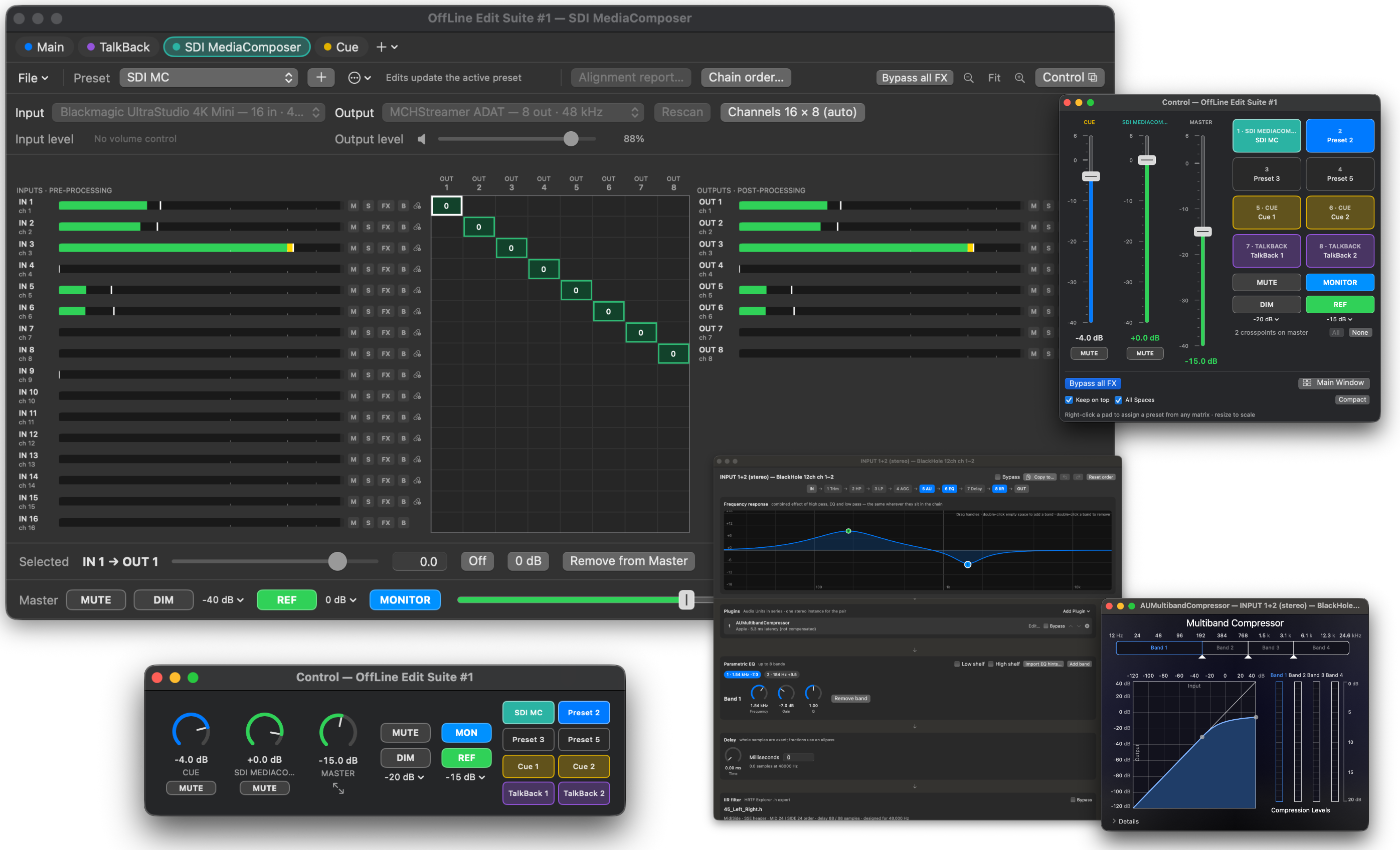
Fulwave Monitor Pro turns your Mac into an SDI audio de-embedder and a monitor system for the whole room. Listen to the embedded audio of SDI sources through Blackmagic UltraStudio and DeckLink devices, add named routers and cue matrices that one fader runs, and put Audio Unit plugins on any channel.
- Price
- From $19.99 one time; $15 upgrade
- Requires
- macOS 14 or later, Apple silicon and Intel
Try it first
Every copy of Fulwave Monitor can run Pro for 30 minutes, once per launch, demo included: Preferences › License › Try Pro for 30 Minutes, or the + menu beside the matrix tabs. When the time runs out, Pro matrices stop but stay in your session, so nothing you built is lost.
Monitor SDI sources: a de-embedder on your Mac
Plug an SDI feed into a Blackmagic UltraStudio or DeckLink and Fulwave Monitor Pro takes the audio out of it. The embedded channels land on the grid like any other input, so you can listen to any of them, on any output, with the same processing, presets and pads as the rest of your monitoring.
- Start a matrix that uses the device and its audio flows. Pro runs the video capture that Blackmagic devices need before they pass audio, following the incoming signal, so there’s no Media Express or other video app to keep open.
- Pick, mix and level embedded channels at the crosspoints, meter them with true peak, and gang pairs for stereo.
- An UltraStudio or DeckLink can be an output too, sending its audio over black video.
- Only the devices a running matrix uses are taken. Others stay free for OBS and other video apps, and when another app lets go of a device, Pro picks it up within about a second.
- Needs Blackmagic’s free Desktop Video software.
Named routers and cue matrices
Add as many matrices as you need beside Main and TalkBack. A router always passes audio, like Main. A cue matrix stays silent until a pad switches one of its presets on, like TalkBack, and can be Summed (any number on at once) or Switched (one at a time).
- Each matrix has its own input and output devices, grid, processing, meters and presets.
- Give each one a name and a color; its tab and its pads carry the color.
- Open any matrix in a window of its own, as many at once as your screens hold.
- Drag tabs into the order you want; the session remembers it.
- Export a matrix as a session file, or import another session's Main as a router or cue matrix.
One fader runs the room
Tie any matrix to Main and it follows Main's master in Monitor mode, keeping its own offset. Mute, Dim and Ref can follow Main too, each chosen per matrix.
- Put any matrix's master beside Main's in the Control window, with its own Mute.
- TalkBack can dim any matrix, each by its own Dim amount.
fulwavemonitor://matrix/…links recall or switch any matrix's presets from JumpDock, scripts or other apps.
Audio Unit plugins on every channel
A Plugins block in every channel's chain holds up to eight Audio Unit effects in series.
- Mono on a single channel, one stereo instance on a ganged pair.
- Open the plugin's own window, or a slider per parameter if it has none.
- Plugin settings are saved in presets and recalled with them.
- Move the block anywhere in the chain, like every other block.
Pricing
One payment, no subscription. Pro sizes are by how many Macs use one key at the same time. Deactivate a Mac to free its seat for another.
- Fulwave Monitor Pro, 3 Macs at once: $19.99. Buy Pro
- Fulwave Monitor Pro (10), 10 Macs at once: $49.99. Buy Pro (10)
- Fulwave Monitor Pro (25), 25 Macs at once: $99.99. Buy Pro (25)
- Site license for more Macs: contact us.
Already have Fulwave Monitor? Upgrade to Pro for $15.00. In the app, Preferences › License › Buy Pro… opens checkout with the upgrade applied, or upgrade here.
Need more Macs later? Moving up a size costs the difference plus $5: Pro to Pro (10) is $35.00, Pro to Pro (25) $85.00, and Pro (10) to Pro (25) $55.00. Preferences › License › Get More Macs… opens it.
Questions
Do I need Fulwave Monitor first?
No. A Pro key unlocks everything on its own. If you already have a standard license, upgrade for $15.00.
What does “Macs at once” mean?
Macs using the key at the same time, not lifetime installs. Deactivate a Mac in Preferences, or remove it on your order page, and its seat is free for another.
What happens if I open a Pro session without Pro?
Main and TalkBack run as usual. Named matrices stay in the session, and saving keeps them, but they are stopped and hidden until Pro is unlocked again.
What if I'm offline?
A licensed copy never locks itself because it can't reach the license server. Once a Mac has activated, it keeps working offline indefinitely, which suits show machines.
Is plugin latency compensated?
No. Each plugin's latency is shown next to it, so you can see what it adds.
Which SDI hardware works?
Blackmagic UltraStudio and DeckLink devices, with Blackmagic’s free Desktop Video software installed. The embedded channels are the ones the device delivers to Core Audio.
Can I still use the device for video at the same time?
One app at a time can run a device’s video. If OBS or another app already has it, its audio still passes; otherwise Pro takes it while a matrix uses the device and lets go when audio stops.